How to fix Ally accessibility issues and get green marks on your course materials
Struggling with red or orange marks in Ally? We convert your .pdf, .doc/.docx, and .ppt/.pptx files into
accessible, editable HTML that scores 97-100% in Ally and meets WCAG 2.1 AA standards. Get green marks faster with our automation-assisted conversion service.
48-hour turnaroundMay be longer for extremely large jobs
Ally score: 97–100%Typical range
Large docs supported100+ pages via chunking
How it works
Zip and upload your files via our secure Dropbox submission link. See submission instructions.
We convert using an automation-assisted workflow and run a basic sanity check (output generated, files open, package complete).
You receive a ZIP of self-contained HTML files and a Professional Remediation Report—ready for review and final checks in Ally.
Notes:
No line-by-line proofreading or manual correction of unclear source content (handwriting, low-quality scans, ambiguous characters).
No formal certification: final review and responsibility remain with the institution.
What you receive
Self-contained HTML per document (no external dependencies)
Searchable, selectable text extracted page-by-page in original order
Math formatted for accessibility using <sup>, <sub>, and ARIA labels (e.g., role="math")
Accessible tables using semantic markup (<caption>, <thead>, <th scope>)
Figure/diagram descriptions plus a Visual Reference Appendix (original page images embedded at the end)
Professional remediation report documenting WCAG 2.1 AA work performed on all files in your batch (separate document included in ZIP)
Designed for Ally workflows—HTML is typically far easier to fix than PDFs
Result: Ally scores typically land in the 97–100% range, and any remaining flags are
usually quick edits because the output is clean HTML.
How we keep costs low
We use an automation-assisted workflow to handle repetitive extraction and HTML packaging efficiently.
This supports fast turnaround and low per-page pricing. Final review and edits are completed by the instructor/institution.
Professional Remediation Documentation
📋Every Delivery Includes a Professional Remediation Report
Document your good-faith accessibility efforts with detailed technical documentation of the WCAG 2.1 AA
remediation work performed. Each delivery includes a separate remediation report that lists all files converted and documents:
Complete file inventory — All documents converted in your batch
Specific WCAG 2.1 success criteria addressed (Perceivable, Operable, Understandable, Robust)
This report is delivered as a separate document in your ZIP file, making it easy to
reference when responding to institutional accessibility questions or reviews.
Real documents we've converted. Each example shows the original PDF
and the accessible HTML output. Your delivery will include a professional remediation report covering all converted files.
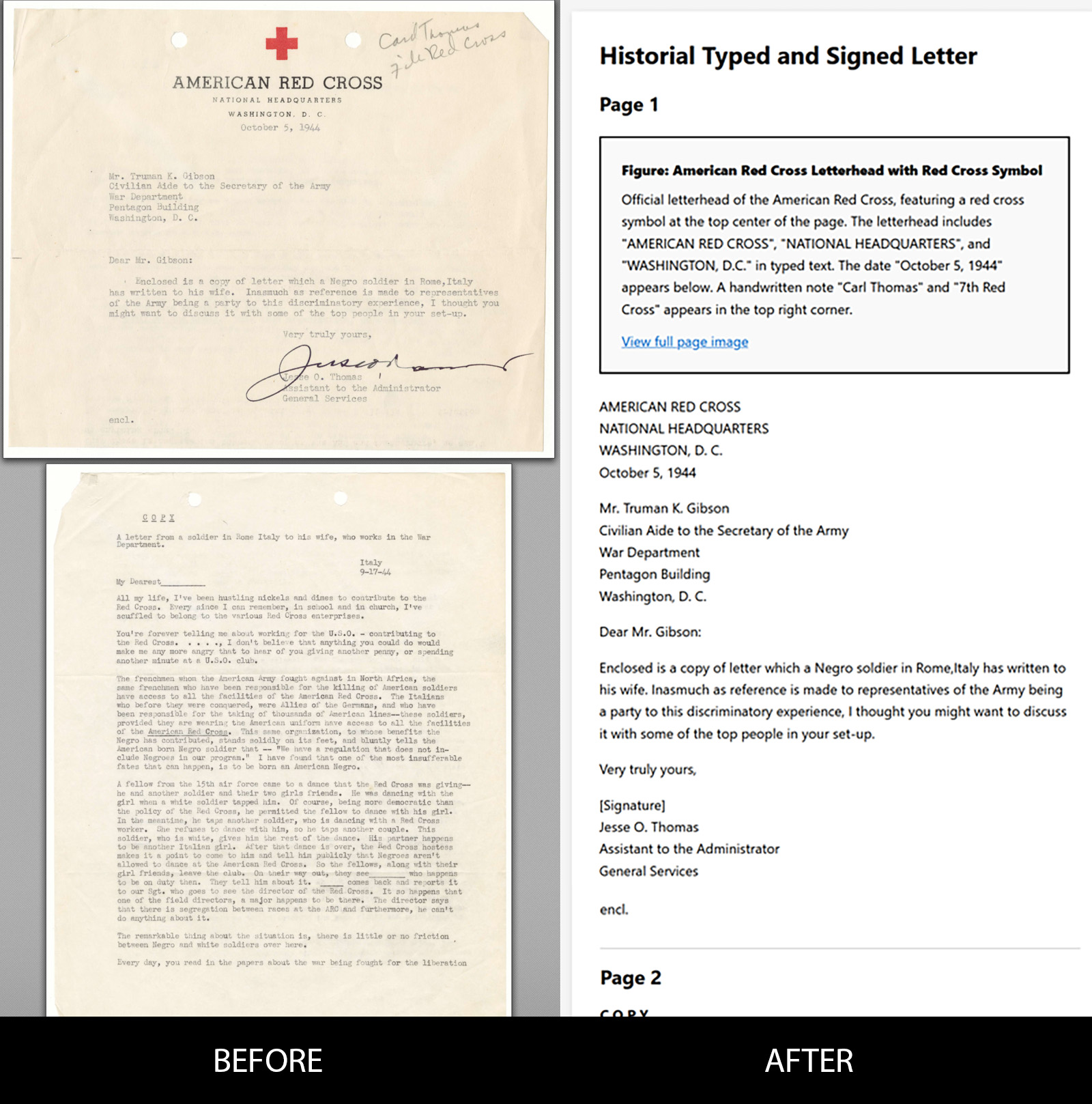
Example 1: Historical Letter (1944)
American Red Cross official correspondence with typed text, handwritten notes,
signature, logo, and aging/discoloration typical of archival documents.
Typed body text extracted accurately
Handwritten marginalia described
Signature and logo properly marked up
Document metadata preserved (date, letterhead)
Aging artifacts (holes, stains) don't interfere with content extraction
Meal planning slides with photo collages, decorative graphics, complex tables,
and multi-column layouts typical of educational and marketing presentations.
Title page images described with meaningful text
Complex seasonal produce table converted to accessible HTML table
Table headers (Spring, Summer, Fall, Winter) properly associated with data
Page structure and reading order preserved across slides
Decorative background graphics don't interfere with content
Clean cursive student notes on programming operators and expressions, including
handwritten text, diagrams, mathematical symbols, and structured lists.
Cursive handwriting accurately transcribed to text
The fastest way to get green marks in Ally is to convert your documents to accessible HTML format.
HTML is much easier to fix than PDFs when Ally flags accessibility issues. Our conversions typically
achieve 97-100% Ally scores right out of the box, and any remaining issues are
simple edits in clean HTML rather than complex PDF remediation.
Is a green Ally score enough for DOJ/OCR requirements?
Not always. While Ally is helpful for catching common accessibility issues, you can get a green score
using shortcuts that don't meet actual WCAG 2.1 AA standards—like marking all images as "decorative"
or using only one heading level. These tactics may satisfy Ally's algorithm but can trigger
DOJ Office for Civil Rights (OCR) complaints.
Our conversions focus on genuine accessibility: properly structured headings,
meaningful image descriptions, semantic HTML tables, and accessible math markup. You get both
high Ally scores AND documents that meet the actual legal standard.
What if my institution questions the accessibility?
Every delivery includes a professional remediation report documenting the specific
WCAG 2.1 Level AA work performed on all files in your batch. This report can be retained for institutional records and demonstrates
good-faith accessibility efforts.
The report includes a complete file inventory, technical implementation details (semantic HTML5 structure, ARIA labels, color contrast
ratios, keyboard navigation), specific success criteria addressed, and the remediation work performed.
This documentation helps respond to questions with concrete evidence of professional accessibility work.
What file types do you support?
We support .pdf, .doc, .docx, .ppt, and .pptx.
What Ally score should I expect?
Ally scores typically range from 97% to 100%. If Ally flags any remaining items,
the HTML format makes them straightforward to resolve compared to editing PDFs.
Is this fully automated?
Not fully. We use an automation-assisted workflow to generate editable HTML.
We do a basic sanity check (for example: output is produced, files open, and the package is complete),
but we do not do line-by-line proofreading or manual correction of unclear source content (e.g., handwriting, low-quality scans, ambiguous characters).
Final review and edits are completed by the instructor/institution.
Do you provide formal WCAG/ADA certification or a legal guarantee?
No. We produce WCAG 2.1 AA–aligned, Ally-friendly HTML intended to support institutional accessibility workflows.
Final review, publication decisions, and responsibility remain with your institution.
However, each delivery includes a professional remediation report documenting the specific work performed,
which can be retained for institutional records.
Do you handle large documents (100+ pages)?
Yes. We use chunking to process large documents reliably (including 100+ page PDFs or slide decks).
How do you handle math?
Math is formatted using accessible HTML (including <sup> and <sub>) and wrapped with
ARIA labels (e.g., role="math") so it's readable and editable.
How do you handle images, diagrams, and graphs?
We include structured figure blocks with descriptive titles and detailed descriptions, plus a
Visual Reference Appendix at the end containing embedded page images for verification.
What is your turnaround time?
Standard turnaround is 48 hours. Extremely large jobs (hundreds of documents) may take longer;
we'll confirm timing up front.
Is my content private?
Yes. Your files are confidential, not resold, and deleted after delivery.
How do I submit files?
Please ZIP your folder structure and upload it via our secure Dropbox submission link (provided on the
submission page). After uploading, email
hello@TeachAbleDocs.com with the filename you uploaded so we can
confirm receipt, count pages, and send your invoice.